Invoice matching software is a tool that checks each supplier invoice against the purchase order and the record of what was delivered or done, then flags anything that doesn't agree before you pay. For UK field service businesses, it takes over the job of comparing merchant invoices, subcontractor bills and van stock receipts by hand across PDFs, spreadsheets and accounts packages.
Key takeaways
Matching protects your margins by making sure every supplier invoice agrees with what you ordered and what actually arrived on site or in the van. Automated invoice matching software does the routine checks for you, flags the exceptions and keeps a clean record for VAT. These are the points field service businesses most need to know first.
- Matching confirms you only pay for what you ordered, at the agreed price, once the goods or work have arrived.
- Software captures invoice data, matches invoices to purchase orders and job records, and sends only the exceptions to a person.
- UK invoices carry extra checks: VAT invoice details, the domestic reverse charge note on construction services and CIS deductions on subcontractor bills.
- Field teams make or break 3-way matching, because their on-site confirmation of what was delivered and fitted is the receipt the invoice is checked against.
- Choose software that links purchase orders to jobs and syncs with your accounting package, so nobody re-keys the same invoice twice.
What is invoice matching?
It's the accounts payable control of checking a supplier invoice against what you agreed to buy and what you received before you approve payment. Charity Commission guidance on internal financial controls sets out the same discipline for charities, and it suits any business that buys on account: check invoices against orders and the receipt of the goods or services ordered.
Matching isn't the same as reconciliation. Matching happens invoice by invoice, before payment. Reconciliation happens later, when you compare a supplier statement or bank feed with your ledger. Where a supplier statement meets HMRC's conditions, you can record its totals, but you must also cross reference all supplies on the supplier statement to invoices received, which is far easier when every invoice was matched on the way in.
How does invoice matching software work?
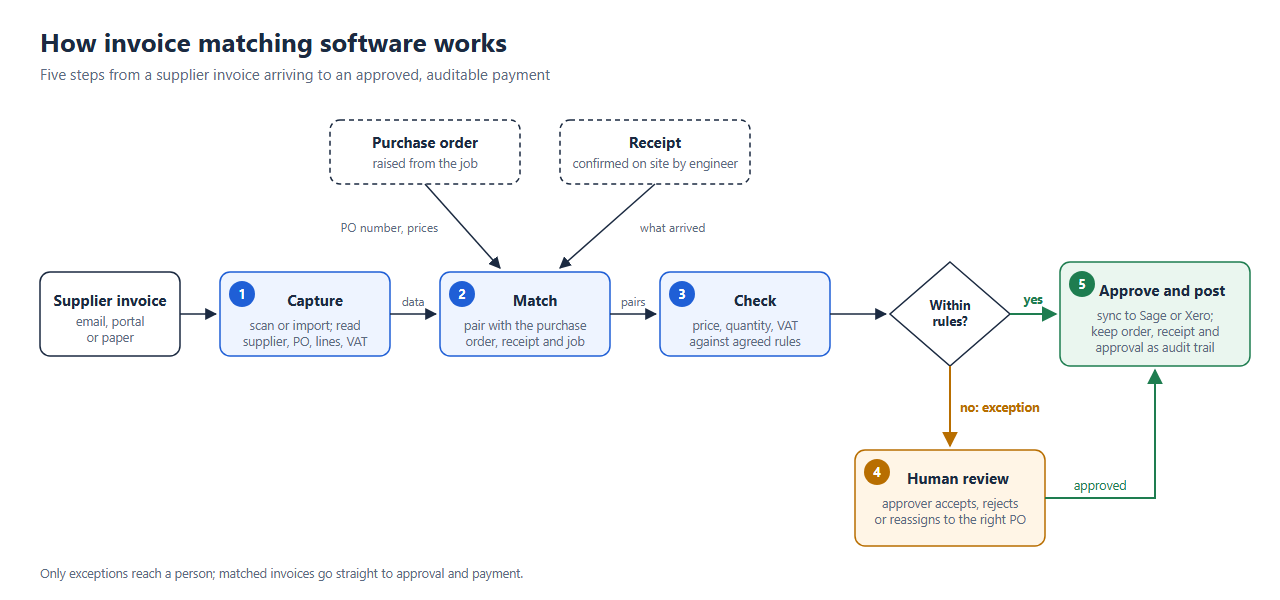
Automated matching turns a manual paper chase into a short, repeatable workflow. It reads each supplier invoice, finds the purchase order and job it belongs to, checks every line against agreed prices and quantities, and only stops when something needs a decision. A typical automated workflow has five steps, from capture through to a complete audit trail.
Capture invoice information automatically
Supplier invoices arrive as email attachments, portal downloads and the odd paper copy left in a van. Matching software scans or imports them and extracts the supplier, invoice number, PO number, lines, VAT and totals, so nobody types them in. HMRC's record-keeping notice describes functional compatible software that scans the invoices received and puts the information in its ledger. If the image is retained and holds all the detail needed for VAT, you don't need to keep the original unless another purpose requires it.
Match the invoice against purchase records
Next, the software matches invoices to purchase orders using the PO number, supplier and line items. This is the core of purchase order matching. In field service, the best match also links the job, so materials bought for a boiler swap or a fire alarm service land against that job's costs. Good work order management makes this step reliable, because every order raised on site or in the office already carries the job reference the invoice needs.
Check for price, quantity and VAT discrepancies
Once paired, each line is compared with the order. A VAT invoice should show, for each description, the quantity of the goods or the extent of the services, the rate of VAT, and the amount payable excluding VAT, along with the supplier's name, address and VAT registration number. Those fields give the software something exact to check. Set a small tolerance for rounding so trivial differences don't create work, and hold back price rises, extra lines or missing VAT details.
Route exceptions for human review and approval
Anything outside the rules goes to a person. That might be the buyer who raised the order, the engineer who took the delivery or a finance approver. Sound controls start with clear, written authority limits for placing orders and approving payments, and software applies them every time: the approver accepts the suggested match, rejects it, or reassigns the invoice to the right order.
Complete the invoice workflow and keep an audit trail
Approved invoices are posted to your accounts package and scheduled for payment, with the order, receipt, approval and any notes stored together. HMRC describes the VAT account as the link (the audit trail) between your business records and your VAT Return, and you must generally keep VAT records for at least 6 years. Keeping the matched invoice, purchase order and approval in one digital record makes that trail easy to follow.
What is 2-way, 3-way and 4-way invoice matching?
The three levels differ in how much evidence a supplier invoice must agree with before payment. 2-way matching compares the invoice with the purchase order. 3-way invoice matching adds proof that the goods or work were received. 4-way matching adds an inspection or acceptance record on top. Pick the level that suits each type of purchase.

One NHS trust explains 3-way matching plainly: when a purchase order number is quoted and there is also a receipt that matches the invoice, the invoice will be automatically matched and paid, and invoices that fail the three-way match go back to the requester or procurement to resolve. For field service teams, the receipt is often the engineer confirming that parts were collected from the merchant or delivered to site, which is why linking purchasing to stock control management matters.
What UK supplier invoices must show before you can match them
UK rules decide what a supplier invoice must contain, and those rules double as your matching checklist. HMRC reminds suppliers that your customers need VAT invoices as evidence for reclaiming, as input tax, the VAT you have charged them. As the customer, a complete VAT invoice is your first matching check.
The domestic reverse charge must be used for most supplies of building and construction services, which can apply to installation work such as heating, electrical and fire protection. When it applies, suppliers must make a note on the invoice to make it clear that the domestic reverse charge applies and that the customer is required to account for the VAT. An invoice that charges VAT on a reverse charge service is a mismatch, even if the PO total looks right.
Subcontractor bills add the Construction Industry Scheme. To make a CIS deduction, you start with the total (gross) amount of the subcontractor's invoice, so the matched invoice needs to show labour and materials clearly before anyone calculates what to pay. For new subcontractors, HMRC adds that before you can pay a new subcontractor, you'll need to 'verify' them, so check verification before the first invoice is approved.
Manual vs automated invoice matching: when does software make sense?
Manual matching works when you raise a handful of orders a month and one person knows every supplier. Automated invoice matching software earns its place once invoices arrive faster than that person can check them, when purchasing data lives in separate systems, or when engineers buy on account and paperwork arrives days later.
Software starts to make sense when any of these sound familiar:
- Invoices sit in inboxes because nobody knows which job they belong to.
- Engineers buy materials on account and the paperwork reaches the office days later.
- The same invoice is keyed into your job system and your accounts package.
- Suppliers chase payments because invoices are stuck waiting for a check.
If VAT figures move between spreadsheets and your accounts by hand, Making Tax Digital becomes a concern too. For VAT records kept under those rules, HMRC states that the use of ‘cut and paste’ or ‘copy and paste’ does not constitute a digital link.
Suppliers notice slow checks as well. Where no payment date was agreed, the law says payment is late 30 days after the customer gets the invoice or the goods or service are delivered, if later, so slow manual checks can push you into paying late.
Common invoice mismatches in field service and how to fix them
Most exceptions come from a few repeat causes: partial deliveries, merchant price changes, purchases made without a PO number, extra lines, the wrong VAT treatment and duplicate bills. Knowing which ones hit your business most often helps you set matching rules that fix the source of the problem, rather than clearing the same exception by hand every month.
What should you look for in invoice matching software?
For UK field service businesses, the best invoice matching software removes separate systems rather than adding another one. It should connect purchase orders to jobs, catch UK VAT and subcontractor issues, route exceptions to the right person and sync cleanly with your accounts package. Use this checklist when you compare options, and ask each vendor which items it supports:
- Purchase orders linked to jobs: orders raised from the job, so materials and subcontractor costs land in job costing automatically.
- Matching rules you control: 2-way and 3-way checks, line-level comparison and tolerances that suit merchant pricing.
- Exception routing with approval limits: each exception goes to the right person, with a full history of who approved what.
- Mobile receipt capture: engineers confirm deliveries and parts used from site, giving you the receipt record 3-way matching needs.
- UK tax handling: VAT invoice checks, reverse charge awareness and clear subcontractor records for CIS. HMRC tells reverse charge businesses to make sure your accounting systems and software can deal with the reverse charge.
- Accounting integration: a live sync with Sage or Xero so matched invoices never need re-keying.
- Digital records: invoice images, orders and approvals stored together and kept for as long as HMRC requires.
Susan, an office manager at a plant engineering business, explains in her review of BigChange what changed when paper job cards became digital job cards connected to each job and its invoice. Pricing is calculated in the financials, so her team invoices more often, and that supports cash flow.
The lesson carries over to supplier invoices. When the job, the order and the paperwork sit in one system, there's less to chase when a bill arrives.
How BigChange Intelligent Matching automates purchase invoice processing
BigChange Intelligent Matching automates purchase order matching inside BigChange's invoice and billing software. It automatically matches invoices with purchase orders to speed up approvals, reduce manual effort and improve accuracy across your finance process. Customers can digitally authorise works online, so a confirmed purchase order and work authorisation is in place, and BigChange integrates with Sage and Xero to avoid double keying.

On the billing side, a clear record of the work speeds up invoicing too. Platform lift specialist Gartec says: "BigChange provides a complete audit trail of work with job reports backed tracking logs and photographs. Invoicing is now much more efficient." Previously it could take up to two weeks to get an invoice out; now Gartec can generate invoices within 48 hours.
Automate invoice matching with BigChange
If supplier invoices are slowing your finance team down, or engineers' purchases are hard to trace back to the jobs they were bought for, connect purchasing, jobs and accounts in one place. Book a demo to see how BigChange Intelligent Matching works with your own purchase orders, suppliers and invoicing process.
Invoice matching software FAQs
What is the difference between invoice matching and invoice reconciliation?
Matching checks each supplier invoice against its purchase order and receipt before payment. Reconciliation comes later and compares supplier statements or bank records with your ledger. HMRC says that if you record totals from a supplier statement, you must also cross reference all supplies on the supplier statement to invoices received, so matching first makes reconciliation faster.
What is a 3-way invoice match?
A 3-way match checks the invoice against the purchase order and a record that the goods or services were received. An NHS trust explains that when a PO number is quoted and there is also a receipt that matches the invoice, the invoice will be automatically matched and paid. Invoices that fail go back for review before payment.
How does purchase order and invoice matching automation work?
Automation captures invoice data, pairs it with the right purchase order and checks lines, prices and VAT against set rules. Matches go through for approval and exceptions go to a person. HMRC describes functional compatible software that scans the invoices received and puts the information in its ledger, so a retained image can replace the paper original.
What happens when an invoice does not match a purchase order?
The invoice is held and sent for review instead of being paid. An NHS hospital trust says it may not be able to validate an invoice where the invoice amounts are higher than the amount on the purchase order (price, quantity or total). The approver then corrects the order, asks the supplier for a credit note or approves the difference.
Do you still need to review invoices when using invoice matching software?
Yes, but only the exceptions. Software clears invoices that match and sends the rest to a person with the right authority. Good practice is to have clear, written authority limits for placing orders and approving payments, so each mismatch reaches someone who can approve, reject or reassign it quickly.
Can BigChange automatically match invoices to purchase orders?
Yes. BigChange Intelligent Matching automatically matches invoices with purchase orders, as described on the BigChange invoicing features page. It's designed to speed up approvals and reduce manual effort, while anything that needs a closer look can still be checked by your team before the supplier is paid.
Is Intelligent Matching included with BigChange?
Intelligent Matching is a feature of BigChange's invoicing and billing software, where it automatically matches invoices with purchase orders. It sits alongside BigChange's other finance tools rather than being a separate product. For pricing and plan details for your business, ask BigChange during a demo.