Job Sheets for Field Service Teams: Job Sheet Templates, Apps and Software
A job sheet is the field-service record for a visit. It captures the request, site, field engineer, work completed, labour, materials, evidence, outcome, follow-up and sign-off.
Use a template for simple, controlled work. Trial an app or software when missing answers, office re-entry, photos, signatures or handoffs keep slowing the next action. For the full definition, open the definition guide. A template suits a simple, controlled workflow. A job sheet app or software becomes worth evaluating when missing fields, office re-entry, photos, signatures, job updates or customer handoffs create recurring friction.
Key takeaways
- Start with the information each downstream team needs, not with the format.
- Use one core set of fields, then add conditional fields for particular job types.
- The lightest suitable format keeps records complete, accessible and usable.
- Test any digital system with real jobs from booking through invoice preparation.
- Treat a job sheet as an operational record, not a replacement for prescribed trade or safety documents.
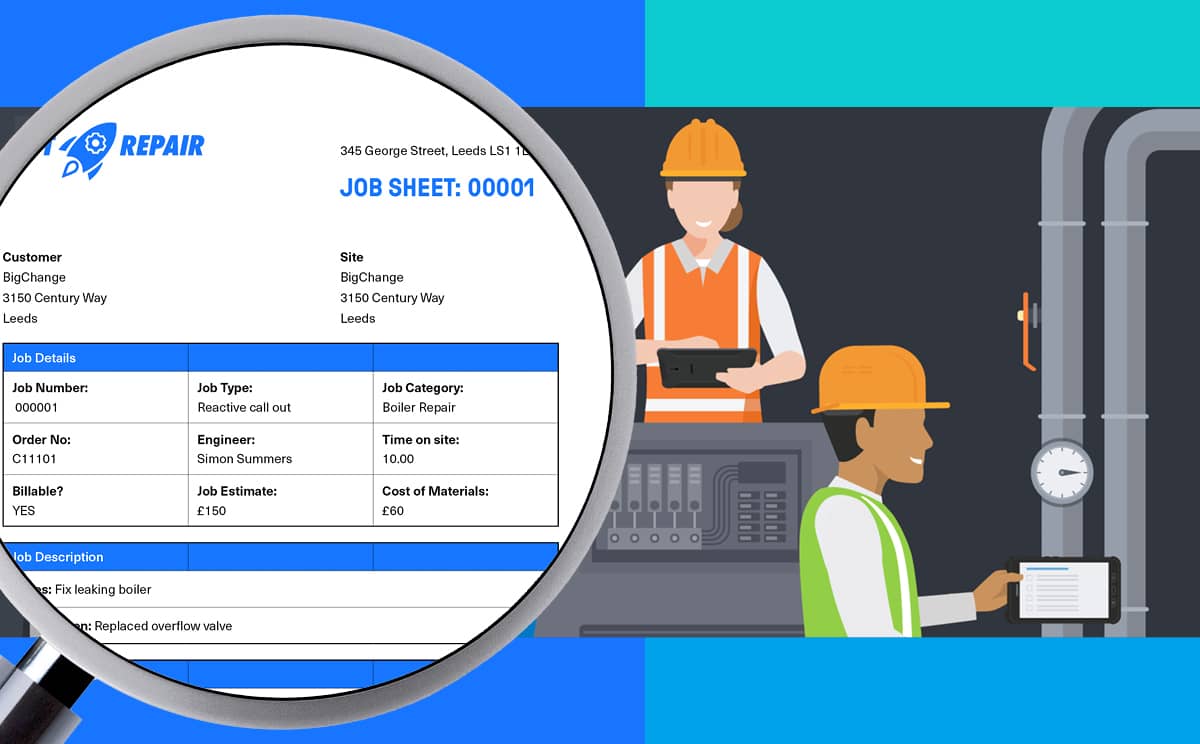
Download your free job sheet template
A practical field-service template puts the fields every visit needs first, then adds conditional fields for the work type. Download the BigChange Excel template and mark the core fields. Add only relevant controls, then test one completed job and one incomplete job before making the format your team's standard for field service work.
Download the free BigChange field-service Excel template, then adapt it around your team's decisions. Use the download to inspect the structure before the rest of the guide.
Use the core fields on every job. Reserve conditional fields for specific work, assets, evidence or controls.
Keep labels plain, remove fields nobody uses and make essential answers obvious. If you need step-by-step setup guidance, the separate free job sheet template guide covers that intent in more detail.
What should every job sheet capture?
Every job sheet needs enough context for the next person to understand the visit. Capture job identity, instructions, completed work, labour, materials, evidence, outcome, follow-up and sign-off. Add asset, site-authorisation, test, photo or approval fields only where the job type or controlled process calls for them, rather than every possible detail.
- Job identity: Unique job number, customer, site, date, contact and assigned engineer.
- Instructions: The reported issue, requested work, access information and any relevant constraints.
- Work completed: A factual description of the inspection, service, repair or installation performed.
- Labour and materials: Time recorded, parts or consumables used, quantities and any traceability details the business needs.
- Evidence: Site notes, readings, photos, attachments and exceptions. Label each item with its stage or asset.
- Outcome: The current job status, what the engineer resolved and what remains outstanding.
- Follow-up: Parts, quote, return visit, escalation or customer action, with a named owner where possible.
- Sign-off: Engineer completion and, when the workflow calls for it, customer acknowledgement or a recorded reason why sign-off was not obtained.

Keep the operational record separate from any trade-specific certificate, method statement or risk record used for the work. For risk assessment, HSE says the minimum is to identify hazards, assess the likelihood and seriousness of harm, and eliminate or control the risk. Configure separate fields or forms for that process.
How digital job sheets improve field-service operations
Use a digital job sheet to connect the field record with the office handoff in one submitted record. Set clear statuses, job-type questions, captured evidence, sign-off, searchable history and downstream fields that match invoicing or customer updates. Configure the workflow around real exceptions, not an ideal demonstration, for each handoff.
Field-to-office visibility and communication
An app places the submitted job record in the office workflow without waiting for paper to return. The office team reviews status, notes and follow-up actions while the visit is still recent. Dispatchers or coordinators then have a basis for closing the job, scheduling a return or asking the engineer for clarification.
Visibility is useful only when statuses have shared meanings. Define when a job is in progress, complete, incomplete, awaiting parts or ready for office review. Overlapping choices create a different kind of ambiguity.
Complete, consistent information, photos and sign-off
Digital forms present different questions by job type, mark essential answers and attach photos or signatures to the relevant record. This gives the team consistent prompts, although proportionality matters. An irrelevant mandatory answer encourages filler text, while vague photo labels leave the office guessing about what an image proves.

Cleaner invoicing and customer-record handoffs
A completed record gives the invoicing team the labour, materials, purchase-order reference and completion evidence it needs in one place. That does not guarantee a faster or more accurate invoice. It removes avoidable searching only when the fields match the invoicing process and the team reviews exceptions before billing.
The same principle applies to customer updates. A clear factual summary is easier to reuse than free-form notes filled with internal shorthand. Decide which information remains internal and which appears in a customer-facing record.
Searchable history and operational analysis
Depending on setup, the system indexes digital records by customer, site, asset, engineer, job type, date or outcome. Repeat-visit and unresolved-issue investigations then start from the stored record. Consistent reason codes create a view of recurring follow-up categories. Keep only codes tied to a real decision.
Paper, spreadsheet, app, or software: which format fits?
Paper, spreadsheet, app and software each fit a different operating context. Compare job volume, field conditions, evidence, handoff complexity and integration needs. Keep the lightest format that preserves a complete record, then reassess when missing sheets, duplicate entry, weak retrieval or repeated integration work becomes routine for your current team.
Whichever format you use, keep inspection, certification and safety records under their own controls. Reference or attach them from the job sheet. The earlier HSE risk-assessment process remains separate.
What should you look for in a job sheet app or software?
Follow one representative job from booking to invoice preparation during a job sheet app or software trial. Check configurable fields, job-type logic, mobile and offline behaviour, photos, signatures, permissions, search, export, integrations and security. Test exception handling before comparing product claims, and ask the supplier to explain each exception in context.
- Configurable fields: Look for clear labels, suitable answer types and sensible defaults.
- Job-type logic: Confirm that job-specific questions appear only where relevant.
- Mobile and offline behaviour: Test real jobs in the places engineers work, including areas with poor connectivity.
- Evidence and sign-off: Check that photos, readings, attachments and signatures link to the correct job or asset.
- Permissions: Verify appropriate separation of field, office and customer-facing information.
- Search and export: Retrieve a complete record as an authorised user and export it for a genuine business task.
- Integrations: Trace the job record into scheduling, customer, stock, accounting or invoicing workflows and look for uncontrolled duplication.
- Security: Ask who manages access, devices, backups, retention and incident handling. The ICO says data security requires organisations to consider risk analysis, organisational policies, and physical and technical measures.
- Real-workflow trial: Test incomplete jobs, return visits, customer refusal to sign, failed uploads and office corrections alongside the ideal demonstration.

For the wider buying decision, use the beginner's software guide. If guided mobile completion is your priority, compare digital worksheets with a dedicated mobile field-service app, then test both against your own workflow.
Two customer workflows to test your job sheet against
Use customer stories as workflow tests, not outcome promises. First, check whether your format keeps commercial fields and evidence together. At Trent's Drains, the problem was split records: cardboard job sheets, Word quotes, Excel job histories and WhatsApp images. The practical test is whether the job card, quote, purchase order and photo stay together without another search.
Apply that test to your own template. If job types need different questions, build that into the form. Keep POs, photos and reporting notes attached to the visit.
Second, check whether the record carries cleanly from field work into billing and follow-up. At WarmZilla, job sheets are sent to engineers and completed onsite with date, time and location-stamped photographs plus a customer signature. The records then move into the back-office system for invoicing and customer follow-up.
Use that as the trial path: field form, evidence, sign-off, office review, invoice preparation and follow-up. If one handoff breaks, the app demo is not enough.

Get more value from every job sheet
The rollout of a job sheet works as a short learning loop. Test representative jobs, collect engineer and office feedback, inspect missing or ignored fields, revise the template and compare the format again. The aim is a reliable record with a clear next action, not the longest possible form for the next cycle.
Treat the first version as a controlled trial:
- Test representative completed, incomplete and return-visit jobs.
- Collect feedback from engineers and each office team using the record.
- Inspect missing, duplicated or routinely ignored fields.
- Revise the template and explain what changed.
- Compare the four format options again.
The goal is not extra fields. It is a reliable record with a clear next action.
Frequently asked questions
What does a job sheet look like?
Every job sheet uses a structured form with a job number, customer and site details, instructions, work completed, labour, materials, evidence, outcome, follow-up and sign-off. The HSE risk-assessment overview offers a comparable checklist format. Formats include printed pages, spreadsheets and guided fields in a mobile app.
What is the difference between a task sheet and a job sheet?
A task sheet lists actions to complete, while a job sheet records the full service visit: context, work, resources, evidence, outcome and sign-off. Cambridge Dictionary's task definition defines the action term. Job sheets include tasks where relevant and create the operational record for dispatch and follow-up.
How to create a job sheet in Excel?
In Excel, start with the free BigChange Excel template above: create a field for each column or labelled cell, then separate core fields from job-specific fields. Test the file with completed and incomplete jobs. Protect labels, define allowed status values and keep one master version. Store photos, signatures and evidence in a defined location.