


Key takeaways
- Job scheduling works best when it covers the whole job lifecycle, from first booking through to payment.
- Engineer skills, availability, location, job duration, parts, and customer access all shape a reliable schedule.
- Maintenance jobs need recurrence rules and equipment history, while installation jobs need readiness checks before teams confirm the date.
- Payments improve when job completion, customer sign-off, invoicing, and payment requests sit in the same workflow.
- Reporting gives managers the evidence to improve future schedules instead of relying on memory.
Spreadsheets and calendar notes work for a small team. They become fragile when the team handles urgent calls, planned maintenance, installations, subcontractors, repeat customers, and same-day changes at once.
The tips below focus on service teams that need job scheduling to support field productivity, customer experience, and cash flow.
What is job scheduling?
This process turns incoming work into a controlled plan for the field. It sets the engineer, time window, route, parts, customer notes, completion steps, and payment handoff. A good schedule gives the office and field team the same view of work as jobs move from booking to completion.
If you need a deeper introduction to the software side, BigChange has a separate beginner's guide to job scheduling software.
Why job scheduling breaks down in service-based businesses
Scheduling breaks down when job details live in separate tools. The calendar shows an appointment, but the parts list, engineer skill, access notes, route, and payment status sit somewhere else. That gap creates avoidable calls, repeat visits, late updates, and slow invoices before the team sees the risk in time.
| Breakdown | Result |
|---|---|
| Urgent call | Planned work moves. |
| Missing part | A simple visit becomes a repeat appointment. |
| Vague job brief | The wrong skill set reaches site. |
| Missing paperwork | Completed work waits for billing. |
These are scheduling management problems rather than calendar problems. The schedule needs to reflect technician capacity, customer commitments, parts, travel time, job priority, and payment workflow.
That is why growing service businesses move from basic calendars to connected job scheduling software.
15 job scheduling tips to streamline service jobs and payments
Use these job scheduling tips as a working checklist, not a one-off tidy-up. Each tip tightens a handoff between booking, dispatch, field work, customer updates, invoice review, and payment follow-up. Start with the handoff that causes the most delay, then move through the rest using completed jobs as evidence for the next change.
| Tip | Scheduling control | What it protects |
|---|---|---|
| 1 | Replace spreadsheets | One live schedule |
| 2 | Triage urgent work | Planned capacity |
| 3 | Match skills and routes | First-time completion |
| 4 | Use job templates | Repeatable standards |
| 5 | Improve time estimates | Realistic diaries |
| 6 | Group similar work | Less wasted travel |
| 7 | Optimise routes | Faster dispatch choices |
| 8 | Use mobile updates | Cleaner office-field handoff |
| 9 | Check stock and parts | Fewer return visits |
| 10 | Automate reminders | Fewer missed appointments |
| 11 | Offer self-service | Lower admin for simple bookings |
| 12 | Schedule maintenance | Reliable recurring work |
| 13 | Prepare installations | Fewer cancelled appointments |
| 14 | Link completion to payment | Faster invoice handoff |
| 15 | Review reports | Better future schedules |
1. Use job scheduling software instead of spreadsheets
Spreadsheets become hard to trust when jobs change during the day. A dispatcher updates one file, an engineer works from an older version, and the office only finds out later that the visit moved.
A dedicated platform gives the team one place to manage bookings, engineer availability, job notes, routes, documents, and completion status. The schedule becomes a shared operational view instead of a private file on one person's desktop.
2. Prioritise urgent jobs before they derail the schedule
Urgent jobs create the biggest scheduling pressure. They interrupt work that already looked planned. Treat urgency as a scheduling rule, not a last-minute argument.
Define what counts as urgent, who has authority to move other work, which customers need immediate contact, and which job types still need a qualified engineer. A clear triage process helps dispatchers protect the schedule while still responding to critical calls.
3. Match jobs to engineer skills, availability, and location
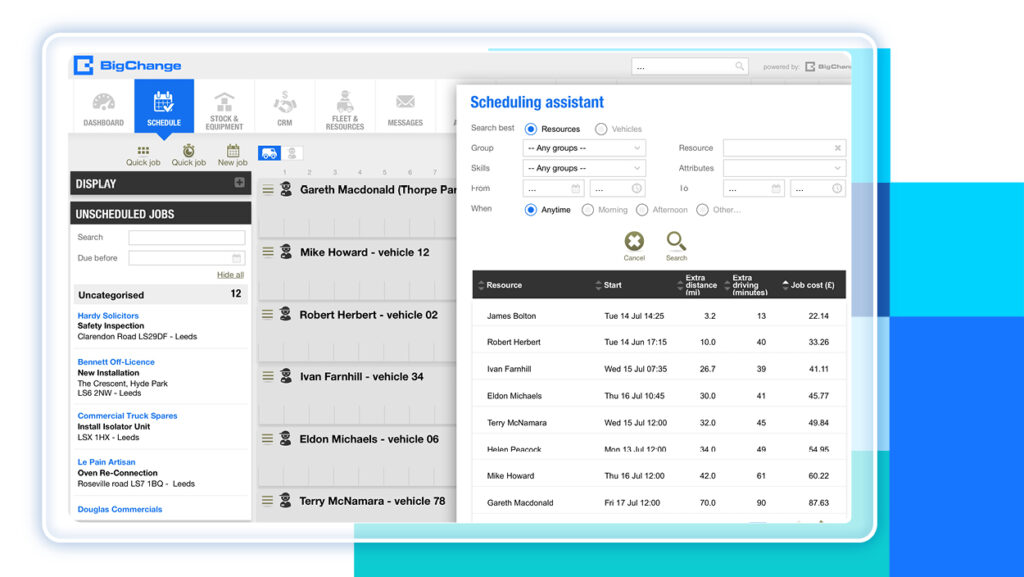
Good job scheduling starts with fit. The right engineer is not simply the nearest person. They need the correct skill set, certification, equipment, parts, access notes, and time window.
A connected schedule shows who is available, who is closest, who has the right skills, and who already has work nearby. That gives dispatchers a practical decision instead of a guess.
4. Create job templates for repeatable work
Repeatable jobs do not need a blank screen every time. Create templates for common job types, including estimated duration, checklist items, parts, documents, risk notes, and customer communication steps.
Templates help dispatchers book work faster and help engineers arrive with clearer instructions. They also reduce the chance that a critical task gets missed on routine maintenance, inspections, call-outs, or installation visits.
5. Build accurate time estimates for each job type
A schedule only works when the time blocks reflect real work. If every job gets the same default duration, the calendar will look tidy but the day will still overrun.
Build estimates by job type, site type, customer type, travel pattern, and job complexity. Include time for arrival, parking, access, setup, completion notes, photos, customer sign-off, and travel to the next job.
6. Group jobs by location, type, or customer
Grouping jobs reduces wasted travel and helps engineers focus. For example, group planned maintenance visits by postcode, installation follow-ups by customer, or similar job types by engineer skill.
Grouping also helps customer communication. If a service team knows an engineer will be in a specific area on a specific day, it becomes easier to offer sensible appointment windows.
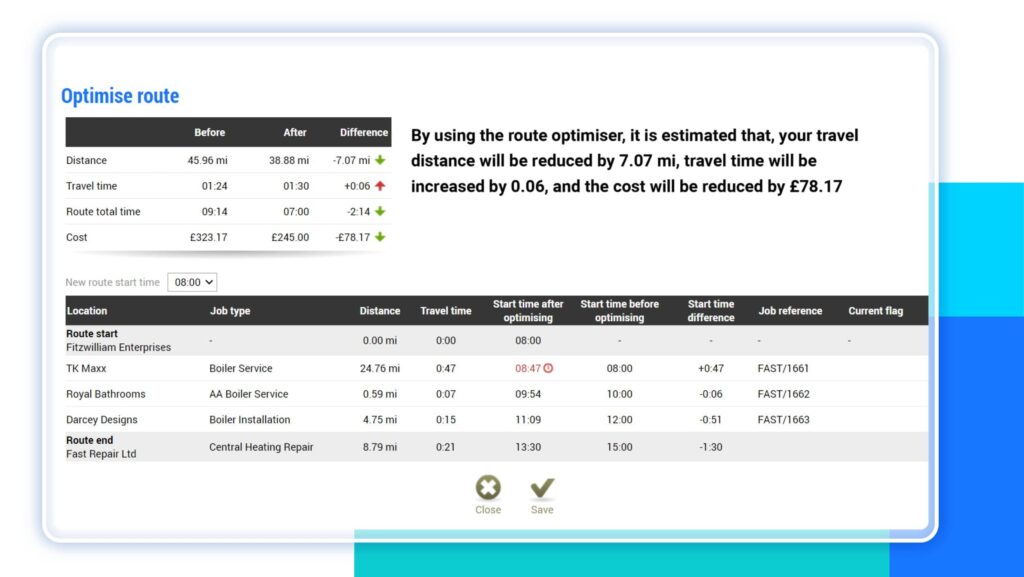
7. Use GPS and route optimisation to reduce wasted travel
Travel time quietly drains the day. A route that looks fine on a map breaks down when traffic, job duration, access windows, and engineer location come into play.
GPS and route optimisation help dispatchers assign work based on real location and practical routes. They also help the office respond when a job overruns or a customer calls for an arrival update.
8. Keep engineers updated through a mobile app
Field teams need current job information without phoning the office for every change. A mobile app gives engineers access to job details, customer notes, documents, forms, photos, and completion steps while they work.
This improves scheduling, as the office sees job progress faster. An early finish gives dispatch room to assign nearby work. A long job prompts the team to update the next customer before the time window slips.

9. Connect scheduling with inventory and parts
A schedule is only realistic if the engineer has what they need. Missing parts turn a planned job into a return visit, which adds travel, admin, customer contact, and delayed billing.
Link job scheduling to stock, equipment, purchase orders, and van inventory where possible. Before confirming a job, the team checks whether critical parts are available, reserved, or waiting on a supplier.
10. Automate customer confirmations and reminders
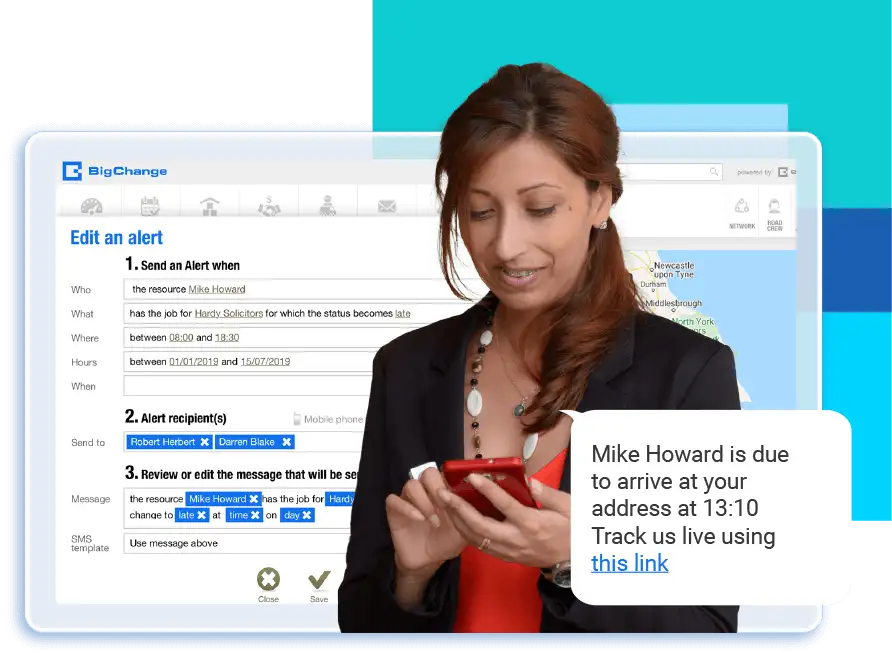
Customers judge the scheduling experience before the engineer arrives. Confirmations, reminders, arrival updates, and completion messages reduce missed appointments and inbound calls.
Keep automated communication specific. Include the appointment window, site address, preparation steps, contact details, and any access requirements the customer needs to know.
11. Offer customer self-service where it makes sense
Self-service works well for repeat customers, planned maintenance, low-complexity appointments, and jobs with clear booking rules. It works less well when the dispatcher needs to assess risk, parts, engineer skill, or site access first.
Use self-service carefully. Let customers request, confirm, or view appointments where the workflow supports it, but keep dispatcher review for complex work.
12. Automate recurring maintenance schedules
Recurring maintenance needs structure. Without it, teams rely on reminders, individual memory, or last year's spreadsheet.
Set recurrence rules by asset, site, customer contract, service interval, engineer skill, and inspection requirement. Link each visit to the right checklist and service history so the engineer understands what happened last time.
The Health and Safety Executive explains that planned preventive maintenance helps prevent problems before they occur and supports safe, efficient equipment operation.
13. Prepare installation jobs before confirming the schedule
Installation scheduling needs more preparation than a standard call-out. The job depends on site readiness, delivery dates, surveys, permits, drawings, customer access, specialist skills, subcontractors, and a longer appointment window.
Create an installation readiness checklist before the team confirms the date. Cover parts, equipment, access, pre-installation information, engineer skills, customer responsibilities, and follow-up tasks.
14. Trigger invoices and payment steps after job completion
Completion starts the payment workflow. If the office waits for paper notes, photos, signatures, or job sheets, invoicing slows down.
Build a clear handoff from job completion to invoice review:
- Completion forms.
- Customer signatures.
- Materials and labour time.
- Photos and approval notes.
For payment terms and late-payment handling, GOV.UK has guidance on late commercial payments. The operational lesson is simple: clear terms, accurate invoices, and prompt follow-up reduce avoidable payment friction.
15. Use reporting to improve scheduling over time

Scheduling improves when managers review evidence. Track planned duration versus actual duration, travel time, first-time completion, repeat visits, cancellations, late arrivals, missed appointments, invoice delay, and payment handoff.
How to schedule maintenance jobs effectively
Maintenance scheduling protects planned service work from getting lost behind urgent call-outs. Each visit needs recurrence rules, asset history, access notes, parts, and the right engineer skill. Treat each maintenance visit as a planned workflow, not a reminder, so the team knows what to prepare before arrival and what to review afterwards.
Start by grouping assets, sites, service intervals, and customer commitments. Then build recurring visits around engineer skills, parts, travel routes, and customer access windows.
For each maintenance job, include:
- Asset history and last visit notes.
- Required checklist, inspection steps, and photos.
- Parts or consumables needed before arrival.
- Engineer skill or certification requirements.
- Customer access instructions and site contacts.
- Follow-up rules for failed checks, remedial work, and quotes.
This structure helps the office avoid last-minute gaps. It also gives engineers better context, which supports first-time completion and faster follow-up.
How to schedule installation jobs effectively
Installation scheduling starts before the appointment lands on the live diary. The team needs site readiness, materials, access, documents, customer responsibilities, and engineer skills confirmed first. That preparation protects long appointment windows and prevents a full installation day from turning into a wasted visit with follow-up work waiting behind it.
Before confirming an installation, check the site, materials, delivery timing, customer responsibilities, engineer skills, subcontractor availability, and any pre-installation documents. A missed dependency turns a full-day installation into wasted travel.
Use a staged workflow:
- Capture the installation scope and site details.
- Confirm parts, equipment, drawings, and access.
- Assign engineers with the right skills and availability.
- Reserve enough time for setup, installation, testing, documentation, and handover.
- Confirm customer preparation steps before the appointment.
- Schedule follow-up or remedial work from the same job record.
How job scheduling software helps manage the full lifecycle
Scheduling software helps most when it connects the whole job lifecycle. It links job records, forms, documents, mobile updates, customer messages, invoices, and payment steps in one place. That connection gives managers a live view of work instead of separate updates from the office and field during the same service day.
BigChange job management software connects scheduling with the wider job lifecycle, so teams manage work from first enquiry through to completion.
On Capterra, Alexina, an office manager in construction, describes BigChange replacing notes and engineer job sheets. Her review describes one workflow for enquiries, quotes, installs, service jobs, invoices, payment follow-up, stock, and reports. It is the same lifecycle problem: scheduling works when the field and office share one job record.
Each stage affects the next:
- Weak booking creates dispatch problems.
- Poor dispatch creates field problems.
- Weak completion creates invoicing delays.
- Slow invoices create payment friction.
Connected scheduling helps teams:
| Workflow stage | Scheduling question | Back-office handoff |
|---|---|---|
| Booking | What work did the customer request? | Customer record and job type |
| Dispatch | Who has the right skill and route? | Confirmed engineer assignment |
| Field work | What does the engineer need on site? | Forms, parts, photos, and notes |
| Completion | What did the engineer finish? | Signed job record and materials |
| Invoice review | What needs charging? | Labour, parts, and customer approval |
| Payment follow-up | What has the customer received? | Invoice and payment request |
BigChange also has a practical guide to job scheduling in easy steps if you want a shorter process view.
Streamline job scheduling with BigChange
BigChange brings scheduling, field updates, job management, customer communication, invoicing, and payments into one field-service platform. That matters when planned maintenance, installations, urgent call-outs, and follow-up admin all compete for the same team. A connected workflow helps each completed job move forward without another manual chase from the office.
Explore BigChange job scheduling software to see how a connected schedule supports field-service teams.
FAQ
What is job scheduling?
It is the process of planning and assigning work to the right engineer at the right time. For field service, it also covers route planning, job details, customer updates, completion records, and the handoff to invoicing. BigChange explains the software side in its beginner's guide to job scheduling software.
What does job scheduling management mean?
This management discipline controls job demand, engineer capacity, job priority, parts, travel time, customer communication, completion status, and payment handoff. Managers also get a way to adjust work during the day. Wider job management software gives this work a connected home across the job lifecycle.
How do you streamline scheduling and payments in a service-based business?
Connect booking, dispatch, mobile job completion, invoice review, and payment follow-up in one workflow. That gives the office cleaner job records before the invoice goes out. GOV.UK guidance on late commercial payments reinforces the value of clear payment terms and prompt follow-up once the business invoices commercial work.
Which steps make maintenance scheduling effective?
Schedule maintenance by asset, site, service interval, engineer skill, parts, and customer access. Use recurring rules, job history, and checklists so each visit starts with the right context. The HSE explains the role of planned preventive maintenance in keeping equipment working safely and efficiently.
What makes installation scheduling effective?
Schedule installation jobs only after checking site readiness, parts, equipment, access, documents, customer responsibilities, engineer skills, and follow-up tasks. Confirm who owns each dependency before the diary slot goes live. The same connected job scheduling software workflow helps the team confirm those details before the appointment is final.


