Job planning is the work you do before a field service job reaches the diary. You decide what the job involves, which skills, parts and permits it needs, and who is free and qualified to do it, then make sure everyone knows the plan. Done well, it means engineers arrive ready to finish the job on the first visit.
Key takeaways
Good job planning turns a customer request into a job your team can deliver without surprises. It sits before scheduling, so the diary only gets jobs that are ready to go. These are the points to remember, and the checklist after them is a quick reference you can use on your next job.
- Planning decides what a job needs. Scheduling then decides who does it and when.
- Every plan starts with the job requirements: scope, site, access, risks and what the customer expects.
- In the UK, some work legally needs a qualified person, such as a Gas Safe registered engineer, so skills checks belong in the plan.
- Capacity planning has to respect working time rules and lone working duties, not just free slots in the diary.
- A plan only works if the engineer, the office and the customer can all see it, and if someone watches it and adjusts it on the day.
What is job planning?
In field service, job planning is the process of working out everything a job needs before it happens: the task, location, risks, skills, parts and time. A job plan turns a customer request into clear instructions, so the right engineer arrives with the right kit and enough time to finish the work in one visit.
The phrase means something different in healthcare. In the NHS, a doctor's job plan is an annual agreement that sets out their duties, responsibilities and objectives, and the resources to support them for the coming year. This guide is about the other kind: planning individual jobs for engineers and technicians who work on customer sites. (Source: BMA overview of job planning)
For a heating, electrical, drainage, fire and security or facilities maintenance business, a job plan usually records the customer and site, the work to be done, any known hazards, the skills or certificates required, the parts and equipment, the target date or service level, and how long the work should take. It's the brief your engineer works from.
What is the difference between job planning and job scheduling?
Planning decides what a job needs, while job scheduling decides who does it and when. Planning comes first and covers scope, skills, parts, risks and timing. Scheduling then fits the planned job into a real diary. When planning is skipped, scheduling turns into guesswork, and engineers find out what is missing only when they reach the customer's site.
Job scheduling is about getting things sorted in advance. It works out who in your field service team does what and when, and makes sure they have what they need. A good plan is what tells the scheduler what each engineer needs. (Source: BigChange guide to job tracking vs job scheduling)
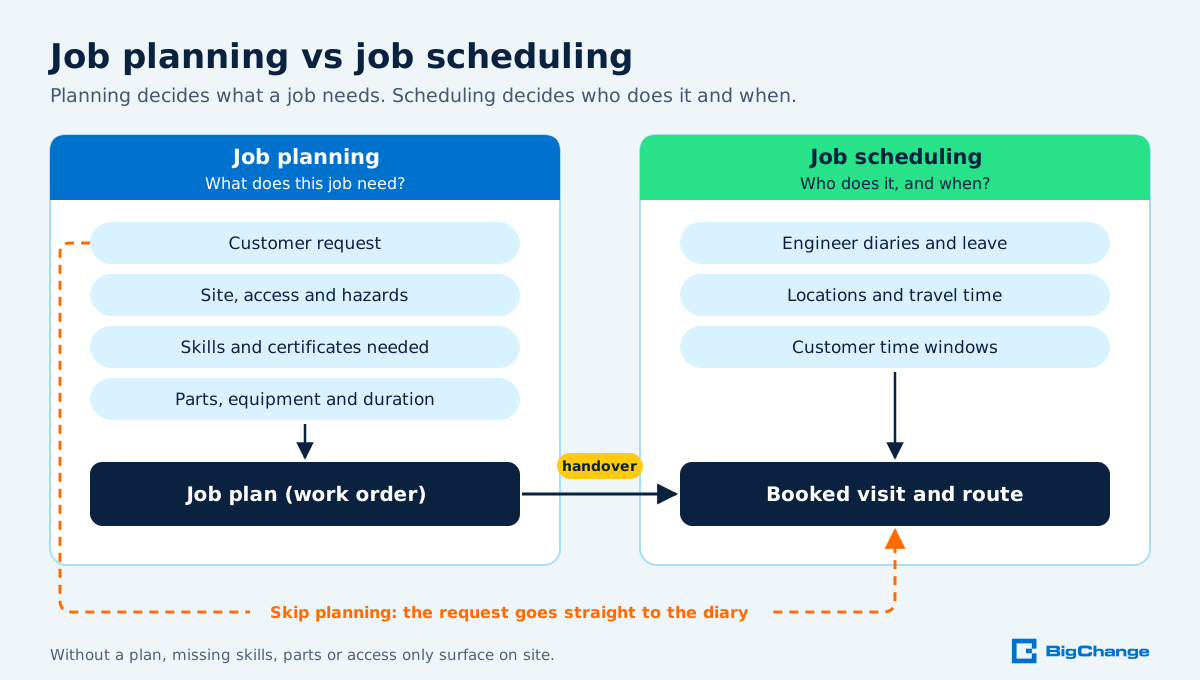
In smaller businesses the same person often does both, sometimes in the same phone call. The two steps still happen in that order, even when both take only a minute.
What does the job planning process involve?
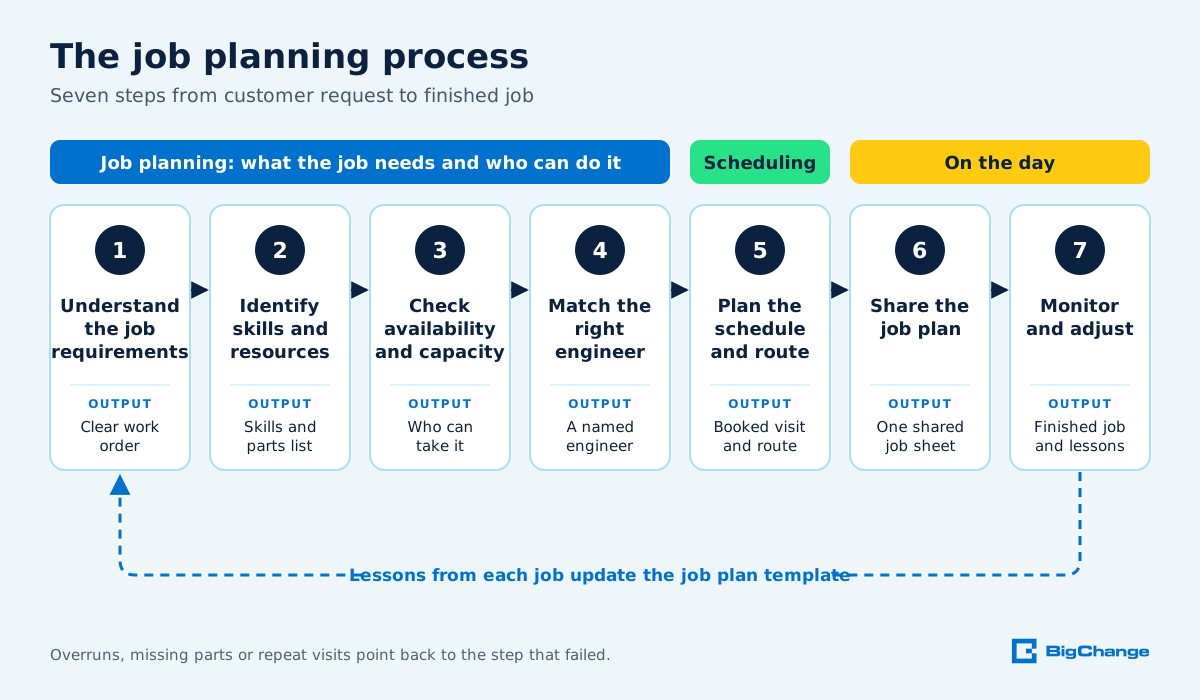
The job planning process involves seven steps that move a job from request to completion: understand the requirements, identify skills and resources, check capacity, match the engineer, plan the schedule and route, share the plan, then monitor and adjust it. Each step answers one question, so the job reaches the diary only when it's ready.
If you need to know how to create a job plan, work through these steps in order. Larger teams split them between planners, schedulers and service managers. In a smaller firm, one office manager may run all seven, which is why a written checklist helps.
Understand the job requirements
Start with what the customer has asked for and what the work actually involves. Capture the address and access details, the asset or system, the fault or service needed, the customer's preferred time, and any service level you've agreed. Most of this lands on the work order, which BigChange defines simply as a specific job or task that needs to be completed for a customer. Good work order management stops details getting lost between the phone call and the van.
Think about safety at this stage too. HSE says employers must at least identify the hazards, judge how likely and serious the harm could be, and act to eliminate the hazard. Noting known hazards on the job plan, such as working at height, confined spaces or live electrics, means the engineer and the office see them before anyone travels. (Source: HSE guidance on managing risks)
A simple field service job plan template covers these fields:
Identify the skills and resources required
Next, work out who is allowed to do the job and what they'll need, because some UK skills checks are legal requirements. In homes and in workplaces such as shops, schools and hospitals, gas fittings work needs a qualified Gas Safe registered engineer. It's illegal for anyone else to do it. (Source: HSE gas safety guidance for employers)
Registration also has to stay current. Engineers must be on the Gas Safe Register to carry out gas work legally, and they need to renew that registration every year. (Source: GOV.UK guidance on registering to carry out gas work)
Air conditioning, refrigeration and heat pump work has its own rule. Technicians must have their own qualifications to work on equipment containing F gas, even if they work for someone else. It's against the law to work with F gas without the correct qualifications. (Source: GOV.UK guidance on F gas qualifications)
Some building work in homes needs building regulations approval, but homeowners don't need to get approval themselves if they use someone registered with a competent person scheme. That's why it's worth recording each engineer's scheme membership. (Source: GOV.UK guidance on building regulations approval)
Then list the resources: parts and consumables, specialist tools, access equipment, vehicle type, and anything that has to be ordered in. A job that needs a part you don't have is a job that isn't ready to schedule.
Check workforce availability and capacity
Capacity is more than a free slot in the diary. Plan around holidays, training, standby rotas, travel time and the hours your engineers can legally work.
Workers can't work more than 48 hours a week on average, normally averaged over 17 weeks. They can opt out of the 48-hour week, but that's the engineer's choice, not a planning assumption. (Source: GOV.UK guidance on maximum weekly working hours)
Rest rules matter when emergency call-outs stretch the day. Workers have the right to 11 hours' rest between working days, and to one uninterrupted 20 minute rest break during the day if they work more than 6 hours. A late-night emergency job can therefore push back the same engineer's first job the next morning. (Source: GOV.UK guidance on rest breaks at work)
Many field engineers work alone, and HSE counts engineers among lone workers: people who work without close or direct supervision. Employers must manage the health and safety risks before anyone works alone, including self-employed contractors. If a job needs two people, plan for two. (Source: HSE guidance on protecting lone workers)
Match the right engineer to the job
Now pick the engineer who best fits the job. Skills and certificates come first, then location, availability and the stock or equipment in their van. Good allocation weighs these factors together: each technician's area, skills, availability, equipment and distance from the site. (Source: BigChange guide to job tracking vs job scheduling)
The payoff is fewer return trips. When engineers arrive with the right skills, parts and information, jobs are more likely to be completed on the first visit. Sending a generalist to a specialist job risks a second visit, and sending a specialist to routine work means paying specialist rates for it. (Source: BigChange guide to work orders)
Nirvana Maintenance, a family-run building maintenance company in Sevenoaks, shows what this looks like at scale. Its customer story explains that BigChange schedules routine jobs up to a year ahead. It also matches reactive call-outs by skill, location and availability, and engineers record completion with time-, date- and location-stamped photos and signatures. The story reports that using BigChange Nirvana now runs more than 300 individual contracts, and its founder describes growing field staff and vehicles without having to grow the back office in step.
Plan the schedule and route
With the engineer chosen, set the time slot and the order of the day. Group nearby jobs, leave realistic travel time and keep a buffer for overruns. BigChange's route optimisation calculates the fastest route between jobs while accounting for traffic, engineer skills and vehicle equipment. (Source: BigChange job scheduling features)
Scheduling choices have consequences beyond the diary. As BigChange's dispatch analysis puts it, every dispatch decision affects travel time, overtime, SLA performance and customer experience. That's why smarter job scheduling starts from a good plan: the scheduler can only make sound choices if each job already lists its skills, parts and duration.
Share the job plan with everyone involved
A plan that lives in one person's head or on the office whiteboard fails as soon as something changes. The engineer needs the job details, the office needs the status, and the customer needs a confirmed time.
In BigChange, you create a job and drop it onto an engineer's schedule, and the update appears on their mobile device within seconds. The field service app also works offline, so engineers can view their schedule, access job details, complete forms, capture photos and collect signatures without connectivity. (Source: BigChange job scheduling features)
The engineer's copy of the plan is the job sheet. BigChange defines it plainly as a working record for a job or site visit. Moving to digital job sheets means the plan and the engineer's notes sit in one place instead of on paper that has to be typed up later.
Tell the customer too. A confirmed appointment with a clear time window makes a wasted trip to an empty property less likely.
Monitor the job and adjust the plan when things change
No plan survives every day intact. Jobs overrun, parts turn out to be wrong, emergencies land and engineers call in sick. Someone in the office needs to see what's happening and move work around early. Job tracking software helps here, because it gives managers a live view of job status, engineer activity, routes, mobile updates, job costs and margin risk.
Close the loop when the job is done. Susan, an office manager at a plant engineering firm, described on Capterra how engineers filled in digital job cards that connected each job to its invoice, rather than passing paper along by hand. Her team invoiced more often, and job management, financials and stock control became one tidier routine.
Finally, compare what happened with what you planned. If a job type keeps overrunning or needing a second visit, change the template, not just the next booking.
Why effective job planning matters for field service businesses
Effective job planning matters because many of the costs of a field service job are set before the engineer sets off. Wrong skills, missing parts and badly ordered days lead to repeat visits, extra travel and overtime. A clear plan protects your margin, your compliance record and your customer's trust, especially on contract work with agreed service levels.
Dispatch decisions show where poor planning costs money. Schedules leak profit when highly skilled technicians are sent to low-value work, when poor clustering causes excessive travel, and when low-margin jobs block higher-value opportunities. Each of those problems can start as a planning gap. (Source: BigChange analysis of dispatch decisions)
Planning also lets you look further ahead. For planned preventive maintenance, the job plan can be set months in advance and reused. Andrew Durdey, Head of Operations at Kiwi FM, explains in the company's customer story: "We can plan routine maintenance and inspections up to a year in advance and respond with the appropriate resources when our customers need us."
When does job planning software become useful?
Software becomes useful for job planning when spreadsheets, whiteboards and phone calls can no longer keep up with your jobs, engineers and changes. Common signs include double bookings, engineers arriving without parts, missed service visits, and office staff re-keying the same details into several systems. At that point, planning, scheduling and job records work better in one shared system.
This is where field service automation earns its place. BigChange describes it as the use of software to automate routine field service tasks such as scheduling, dispatching, work order management, customer communications and invoicing. Automation doesn't replace the planner's judgement. It removes the copying, checking and chasing around it.
BigChange's job scheduling software builds several planning checks into the system. When you drag a job onto a schedule, the system checks for conflicts automatically and prevents double booking. You can set up recurring service schedules for PPM work, so the software creates work orders automatically at the intervals you specify. You can also build mandatory risk assessments and safety forms into job workflows, so engineers can't mark jobs complete until they fill out the required compliance documentation on their mobile device.
Job planning in action: How CDC Draincare improved productivity
CDC Draincare shows how joined-up job planning supports growth. The drainage company works nationwide from Leeds and Manchester, and its customer story explains that vehicle tracking, accounts and job management used to run separately. Bringing them into one system in BigChange meant contact and invoice data synchronised with Xero, so nobody keys it twice.

Simeon Turner, Group Operations Director at CDC Draincare, describes the result in the CDC Draincare customer story: "We’ve doubled the number of jobs we do nationwide without having to increase staff to manage the extra workload so we’re probably twice as productive in the office."
The lesson for any field service business is that growth exposes weak planning first. Keeping jobs, engineers and invoices in one system can help the office absorb more work without the same rise in admin.
Improve your job planning process with BigChange
Better job planning starts with the seven steps in this guide: understand the job, confirm skills and resources, check capacity, match the engineer, plan the schedule and route, share the plan, and monitor it on the day. Write them into a checklist your team uses on every job, then look for the steps that still rely on memory or paper.
A good place to start is last month's repeat visits. Trace each one back to the step that failed, then add that check to your job plan template.
If your team is outgrowing spreadsheets and whiteboards, BigChange brings job scheduling software, route optimisation and mobile job details together in one system. Book a BigChange demo to see how it would work for your engineers and your customers.
Job planning FAQs
How do you write a job plan for a field service job?
Write a job plan by recording what the job involves, where it is, known hazards, the skills and parts it needs, and how long it should take. Start from the work order, which is a specific job or task that needs to be completed for a customer. Then assign the engineer. (Source: BigChange guide to work orders)
What should a field service job plan include?
A field service job plan should include the customer and site, the work required, asset details, hazards, the skills or certificates needed, parts and equipment, and timing. Hazards matter because employers must, at minimum, identify what could cause injury or illness and act on the risk. (Source: HSE guidance on managing risks)
How many hours a week can a field engineer work in the UK?
Under UK working time rules, a field engineer can work up to 48 hours a week on average, normally averaged over 17 weeks. Workers can choose to opt out, but plan rotas and call-out cover inside that limit unless an engineer has opted out. (Source: GOV.UK guidance on maximum weekly working hours)
Which jobs need a specially qualified engineer in the UK?
Gas work and work on equipment containing F gas legally need qualified people. Work on gas fittings in homes and many workplaces must be done by a Gas Safe registered engineer, and F gas technicians need their own qualifications. Record each engineer's registrations. (Sources: HSE gas safety guidance and GOV.UK F gas guidance)
When does a field service business need job planning software?
You need job planning software when double bookings, missed visits and re-keyed job details start costing time and money. With BigChange's job scheduling software, the system checks for conflicts automatically when you drag a job onto a schedule and prevents the double booking.